App Store Connect sales report explained
App Store Connect sales report explained: what Units, Customer Price and Developer Proceeds mean, and why it never matches the Financial Report.
By Torstein Skulbru · · 7 min read · Facts checked
On this page
- Which App Store Connect report answers which question?
- What do Units, Customer Price and Developer Proceeds mean?
- What does one row look like?
- What do the Product Type Identifier codes mean?
- How do subscription and refund rows show up?
- Why does Sales and Trends not match the Financial Report?
- A five-minute monthly check
- How does Plask read the report?
The App Store Connect sales report explained in one line: Units is how many were sold, Customer Price is what the customer paid per unit including tax, and Developer Proceeds is what you receive per unit after tax and Apple's commission. Multiply Units by Developer Proceeds and you have the money for that row.
Plask (plask.dev) reads exactly these columns, so this post walks through them, then explains why the numbers in Sales and Trends do not match the Financial Report you get paid from.
Which App Store Connect report answers which question?#
There are two places to look, and they are built for different jobs.
| Sales and Trends | Payments and Financial Reports | |
|---|---|---|
| Answers | What sold, where, and roughly how much | What Apple actually paid you |
| Freshness | Dashboard: hourly data, generally within about two hours. Downloaded daily reports: available the following day | Previous fiscal month, by the first Friday of the current fiscal month |
| Proceeds | Estimates | Finalized |
| Currency | Dashboard shows USD estimates; downloaded reports use the customer's local currency | Converted to your bank account's currency |
Apple says proceeds in Sales and Trends "aren't final" (Apple, view units, proceeds, sales). That page also gives the dashboard's hourly data and its UTC default, which you can switch to Pacific Time.
Downloaded reports are different: "Sales and Trends provides next-day data", based on Pacific Time (Apple, download and view reports). Daily reports are available the following day, generally by 8 a.m. PT (Apple, report availability).
Financial reports are "made available for the previous fiscal month's earnings by the first Friday of the current fiscal month" (Apple, receiving payments). The currency row comes from Apple's comparison of the tools (Apple, differences in reporting tools).
Inside Sales and Trends you can download several report types. The one this post is about is the Summary Sales Report: aggregated sales and download data for your apps and In-App Purchases. There is also a Subscription Report for active subscriptions.
What do Units, Customer Price and Developer Proceeds mean?#
Each row of the Summary Sales Report is one product, in one country, for one period. These are Apple's definitions (Apple, Summary Sales Report):
| Column | What it holds |
|---|---|
| Units | Aggregated number of units. Negative means a refund. |
| Customer Price | Price per unit billed to the customer, including any taxes Apple collects and remits. |
| Customer Currency | The currency the customer paid in. |
| Developer Proceeds | What you receive per unit: customer price minus applicable taxes and Apple's commission. |
| Currency of Proceeds | The currency you are paid in. |
| Product Type Identifier | The kind of transaction, such as a download, an update or an In-App Purchase. |
| Country Code | The App Store country or region of the purchase. |
| Subscription | Whether an auto-renewable subscription is new or a renewal. |
Both money columns are per unit. Developer Proceeds is not the row total.
What does one row look like?#
Here is one made-up row for a subscription sold in Germany. These are illustrative numbers, not a real app.
| Column | Value | How to read it |
|---|---|---|
| Product Type Identifier | IAY | An auto-renewable subscription |
| Subscription | (new, as a first-time subscriber) | Apple only says "new or a renewal"; the exact text in the cell may differ |
| Country Code | DE | Sold on the German storefront |
| Units | 4 | Four purchases in the period |
| Customer Price | 4.99 | Each customer paid 4.99, tax included |
| Customer Currency | EUR | They paid in euros |
| Developer Proceeds | 3.00 | You receive 3.00 per unit |
| Currency of Proceeds | EUR | Paid to you in euros |
The row total is 4 x 3.00 = 12.00 EUR in proceeds, against 4 x 4.99 = 19.96 EUR billed. The gap is tax plus commission. The gross vs proceeds post shows that arithmetic step by step.
Customer currency and proceeds currency can differ, and a downloaded report shows amounts as the customer transacted them. Apple's Sales and Trends dashboard instead estimates sales and proceeds in USD, using a rolling average of the previous month's exchange rates. If you want one currency, convert it yourself and treat it as an estimate.
What do the Product Type Identifier codes mean?#
The column separates downloads, updates and purchases. Apple lists the full set (Apple, product type identifiers). The ones you will see most:
| Code | Meaning |
|---|---|
| 1 | Free or paid app (iOS, iPadOS, visionOS, watchOS) |
| 7 | App update (iOS, tvOS, visionOS, watchOS) |
| 3 | Re-download |
| IA1 | In-App Purchase (iOS, iPadOS, visionOS) |
| IAY | Auto-renewable subscription (iOS, iPadOS, visionOS) |
| IA9 | Non-renewing subscription (iOS, iPadOS, visionOS) |
| F1 | Free or paid app on Mac |
Rows with zero proceeds are not necessarily errors: free downloads and updates have none (Apple, download and view reports).
How do subscription and refund rows show up?#
Two columns do the work. Subscription says whether a purchase is new or a renewal, and a returning subscriber who resubscribes counts as a renewal. Units goes negative for a refund.
Apple's note on refunds: negative values for Units and Customer Price, and positive values for Developer Proceeds (Apple, Summary Sales Report). So multiplying Units by Developer Proceeds still gives a negative number for the row, which is what you want. A Units value of 0 may mean a partial refund.
For subscriptions, the Proceeds Reason column reads "Rate After One Year" once a subscriber has been active for more than a year, because the share rises from 70% to 85% of the price minus tax.
Why does Sales and Trends not match the Financial Report?#
Apple lists why the two differ. Four reasons, all from its docs:
- Estimates versus final. Sales and Trends proceeds are estimates. Payments and Financial Reports use the exchange rate that converts each report's currency to your bank account's currency.
- Timing. A transaction may not show in Sales and Trends until the customer's payment is processed, collected and invoiced, sometimes in the following fiscal month. Transactions without collected payment never reach financial reports.
- Refunds and billing retries can be recorded at different times in the two tools.
- Calendars. Financial reports follow Apple's fiscal calendar, not calendar months.
Sources: (Apple, differences in reporting tools), (Apple, view units, proceeds, sales) and (Apple, overview of receiving payments).
The Financial Report also names its columns differently. There the unit count is Quantity, the per-unit proceeds are Partner Share, and Quantity times Partner Share is Extended Partner Share. Customer Price is still Customer Price (Apple, financial report fields). Same ideas, different headers.
A five-minute monthly check#
- Wait for the Financial Report of the month you want. Until it exists, proceeds are estimates.
- Add up Extended Partner Share per currency for the month.
- Compare with Sales and Trends for the same fiscal month. Expect small differences from exchange rates and late refunds.
- If the gap is large, look first at refunds, then at transactions that straddle a month end.
- Use the proceeds calculator to sanity check a single price point.
How does Plask read the report?#
Plask reads the daily Summary Sales and Subscription summary reports through the App Store Connect API, using a Team key you create with the Sales role, plus your vendor number. Apple lists Admin, Finance and Sales as the roles that can view Sales and Trends (Apple, view units, proceeds, sales).
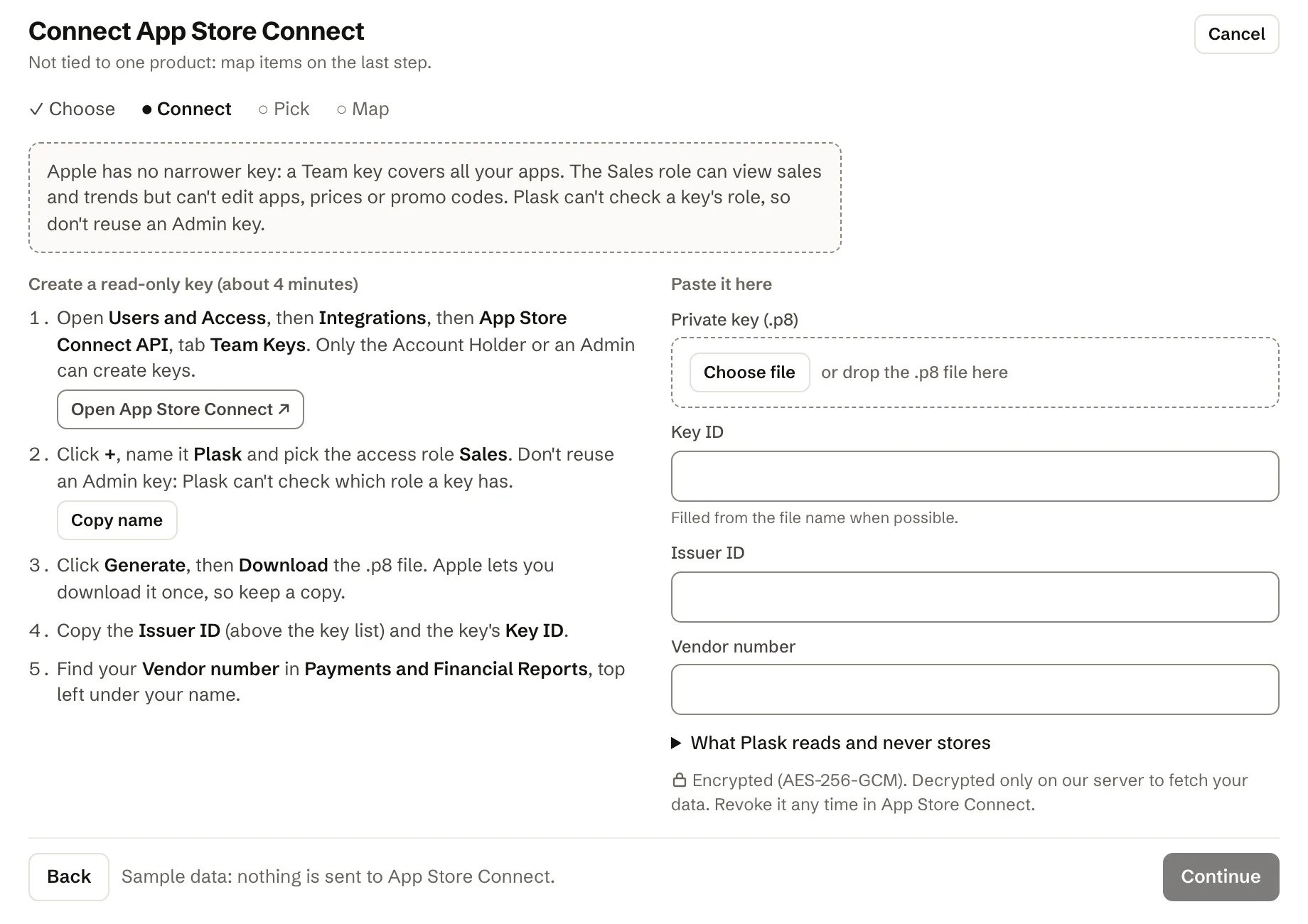
What that means in practice:
- It uses Units, Developer Proceeds, Customer Price and the currency columns from the table above, per app and country. It does not read customer-level reports.
- Net revenue per row is Units times Developer Proceeds. Refunds reduce net revenue.
- If Apple changes the report layout and a needed column is missing, the sync stops instead of importing wrong numbers.
- Plask cannot check which role a key has, so do not reuse an Admin key. A Team key covers all your apps.
- These are Sales and Trends figures, not the finalized Financial Report. Plask does not replace it for the number Apple pays you.
What the key can and cannot read is on the features page. If RevenueCat already covers an app, you do not need both for the same sales; see App Store Connect vs RevenueCat.